コンテンツにスキップ
新年、新しいお買い得品。最大 44% オフ 🎁今すぐ購入↗

Slate 7 (GL-BE3600) デュアルバンド Wi-Fi 7 トラベルルーター

GL.iNet による
元の価格 USD169.99 - 元の価格 USD169.99
元の価格 USD169.99
USD169.99
USD169.99 - USD169.99
現在の価格 USD169.99
バージョンを選択します
⚠️BEFORE YOU BUY
  • The cellular feature is restricted in Russia, Belarus, Cuba, Iran, North Korea, Syria, and the Crimean Peninsula due to modem limitations.

Bulk Order

For bulk orders of 30 units or less, please refer to our Partner Program for wholesale pricing and details. For larger orders of more than 30 units, kindly contact our customer service team at cs@gl-inet.com.
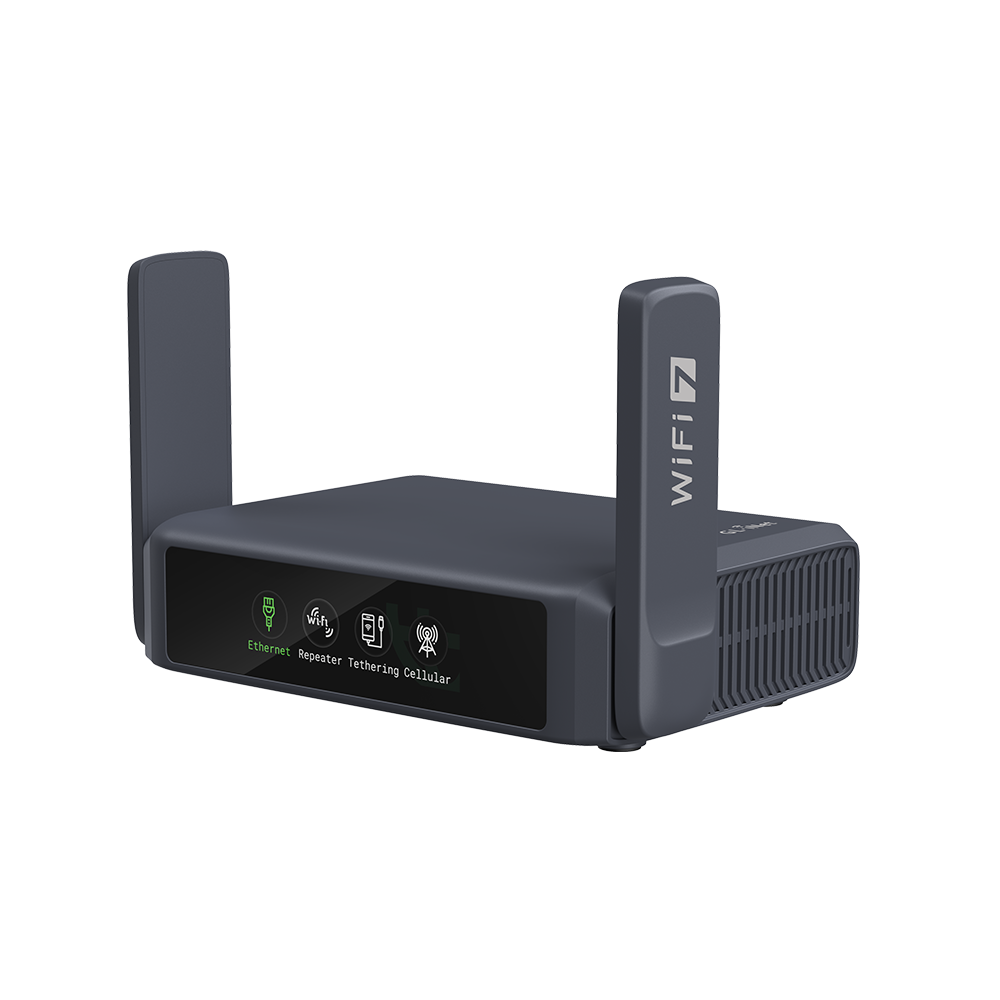
 

スレート7に会う

デュアルバンド Wi-Fi 7 トラベルルーター

GL.iNet 初のデュアルバンド Wi-Fi 7 トラベルルーター

Slate 7 は、より高速でより安定した接続を提供し、どんな環境でも接続を維持できるようにします。デュアル 2.5G 高速ポートを搭載し、超高速ネットワーク パフォーマンスを提供し、ストリーミング、ゲーム、ビデオ通話などの要求の厳しいタスクに最適です。コンパクトでポータブルなデザインは、出張や休暇に最適で、どこにいても安全なインターネット アクセスを提供します。

マックス。 688 Mbps (2.4GHz) + 2882 Mbps (5GHz) 高速Wi-Fi速度
デュアル2.5G WAN ポート (1x WAN ポートと 1x LAN ポート)
サポート PD対応Type-C電源 互換性、軽量アダプターを搭載

Wi-Fi 7
3600Mbps

VPNサーバー

デュアル 2.5G ポート

30歳以上 VPNサービス


オープンWrt
プリインストール

PD 電源ポート

AdGuardホーム

ドメイン名

USB 3.0 ポート

Wi-Fi 7

5GHz

 
2882 Mbps

2.4GHz

 
668 Mbps

超高速Wi-Fi 7スピード

Wi-Fi 7 テクノロジーを搭載した Slate 7 は、2.4GHz で最大 688 Mbps、5GHz で最大 2882 Mbps の速度を実現し、スムーズな 4K ビデオ ストリーミング、旅行中の公共 Wi-Fi への安全なアクセス、出張時の効率的な接続を保証します。

コンパクトで便利

現代の旅行者向け

わずか 130 x 91 x 34 mm のコンパクトなデザインで、外出先でもシームレスにインターネットにアクセスするのに便利です。

傑作の

ハードウェアエンジニアリング

Slate 7 は、PD 互換性を備えた Type-C 電源インターフェイスを備えており、軽量アダプターと組み合わせることで利便性と携帯性が向上します。
1GB の DDR4 メモリと 512MB の NAND フラッシュ ストレージを搭載した Slate 7 は、スムーズな操作と、重要な構成のための十分なスペースを保証します。

お気に入りの安全なインターネット

VPNサービス
24時間年中無休

Slate 7 には、OpenVPN と WireGuard® をサポートする 30 を超える組み込み VPN サービスが含まれています。この統合 VPN は、インターネット接続を暗号化し、機密データを脅威から保護し、公共の Wi-Fi への安全なアクセスを提供することで、セキュリティを強化します。旅行先に関係なく、安心してブラウジング、ストリーミング、通信を行うことができます。

120台以上のデバイスに同時に接続

高度な強化 OFDMA テクノロジーを搭載した Slate 7 は、複数のデバイス間でリソースを効率的に割り当てて帯域幅を最適化し、遅延を最小限に抑えてシームレスなデータ転送を実現します。高密度環境でも要求の厳しいアプリケーションでも、Slate 7 は安定した高速接続を提供し、妥協することなく多数の接続を処理するのに理想的なソリューションです。


Slate 7 でインターネットの可能性を最大限に引き出す

Slate 7 は、マルチリンク操作 (MLO)、改良された OFDMA、4K QAM、プリアンブル パンクチャなどの進歩により、超高速、遅延の低減、混雑した環境での接続性の向上を実現し、ワイヤレス テクノロジーの未来を体現しています。

Specifications:

  • CPU: Qualcomm クアッドコア @1.1GHz
  • Memory / Storage: 1GB DDR4 / NANDフラッシュ512MB
  • Protocol: IEEE 802.11a/b/g/n/ac/ax/be
  • Wi-Fi Speed: 688Mbps (2.4GHz)、2882Mbps (5GHz)
  • Antennas: 折りたたみ式外部Wi-Fiアンテナ x 2
  • Cellular: 該当なし
  • Battery: 該当なし
  • TF Card Slot: 該当なし
  • USB Port: USB3.0 タイプA
  • Ethernet Port: 1 x 2.5G WAN、1 x 2.5G LAN
  • Ethernet Speed: WAN ポート: 1 x 2.5G ポート (10/100/1000/2500Mbps) LAN ポート: 1 x 2.5G ポート (10/100/1000/2500Mbps)
  • Power Input: タイプC、5V/3A、9V/3A、12V/2.5A
  • Power Consumption: <18W(USBなし)
  • Dimension / Weight: 130 x 91 x 34mm(L*幅*高さ) / 295 g

Package Content:

  • 1 x Slate 7 (GL-BE3600) Router
  • 1 x Power Adapter
  • 1 x Ethernet Cable
  • 1 x Warranty Card
  • 1 x User Manual

Tools & Downloadables:

Exclusive Wi-Fi 7 Router Bundle – Save $30 Instantly!

One sensor can pair up with multiple lights at once.
💡Just a note: Don't forget to choose your Smart+ Sensors in STEP 2!

FAQ

Product Initial Setup Guide

Visit the User Guide page and choose the product model and specification required for setup from the options on the left-hand side of the page.

How to Set Up OpenVPN Client on GL.iNet Router

Navigate to the OpenVPN Client Configuration section, where you can follow the provided guide to effortlessly unlock NordVPN and OpenVPN settings, ensuring seamless VPN functionality.

How to Set Up WireGuard Client on GL.iNet Router

Visit the WireGuard VPN Client page and refer to the guide to effortlessly configure settings for AzireVPN, Mullvad, and other WireGuard client features.

How to Connect to the Internet via an existing Wi-Fi by Repeater

Repeater Mode Basic Setup Guide

How to Build Your Own WireGuard Home Server

Proceed to the Tutorials section and refer to the guide to effortlessly complete the setup of your WireGuard Home Server.

How to do if Can't access web Admin Panel

Visit the FAQ page and search for the "Can't access the web Admin Panel" section to find the specific reasons and solutions for this issue.

Overall rating: 4.894737 / 5 from 38 reviews.

AI Generated Review Summary

The Slate 7 (GL-BE3600) Dual-band Wi-Fi 7 Travel Router offers lightning-fast speeds, stable connections, and a compact design. Its touchscreen interface simplifies network management, and it supports multiple VPN services for secure internet access. Ideal for travelers and remote workers, it ensures seamless connectivity and enhanced productivity.

Summary topics

  • Device Quality: 20%
  • Setup Ease: 17%

Review topics: ["shipping","size","service","issues","features","setup","interface","coverage","hardware","router","device","touchscreen","settings","powerhouse","unit"].

Review highlights

  • "Slate 7 unit is compact and made for travel, The setup was seamless using the GL."Michael D.
  • "The setup is pretty straightforward, with an easy-to-use interface."Jose V.
  • "Fantastic little device."Steffen B.

Reviews

A compact but incredibly powerful

"A compact but incredibly powerful travel router—Wi‑Fi 7 speeds, stable performance, and flexible settings make it perfect for both home and on‑the‑go use."

Ramos W. (5/5)

Great little powerhouse to bring with you while traveling

"I travel for work, and I've always wondered if there's a better way to manage my devices without relying solely on VPNs and manually configuring each device I bring. With the Slate, I can count on my devices being secured as soon as I connect them to the Internet, whether to the Hotel's Wi-Fi or mobile hotspots, which adds an extra layer of security. The setup is pretty straightforward, with an easy-to-use interface. While I didn't use the touchscreen that much it's nice to have the option"

Jose V. (5/5)

Just perfect

"Clearly a premium product. Setup was extremely easy. Touchscreen works as expected and is a nice touch. Feature set is super versatile including cellular, modem and repeater modes. Comes with the same software as the other routers which has to be the best out of any other router software. Extremely customizeable. Was especially impressed with the charging block, swappable plugs and the US plug is built in by default with the other plug types going on top."

Arseny A. (5/5)

Great compact travel router

"Great travel router. Compact but feature-packed settings. I'm using it in the house right now as my main device, but I'm planning to take it with me in my travels. Signal strength is also great. The touchscreen is very convenient. No complaints at the moment."

J R. (5/5)

Good

"Good"

ZHI Y. (5/5)

Quick to setup, quick to boot

"Awesome piece of tech. Now I am able to use my Chromecast at my relatives or at a jotelcwithout fuzzing around inside a VPN app. Works very well and the UI is intuitive."

Moritz (5/5)

Good router

"I can activate multiple VPN servers at the same time. Every device can be assigned to different locations to fight geographical censorship for Netlix. Your privacy is protected from ISP and public wifi hackers."

Alfred (5/5)

Everything works very well and

"Everything works very well and the setup is very easy. I cancelled the NBN internet at my house. I share the internet from my phone; YouTube is sufficient for me since I use it mainly for general internet usage. The repeater feature works very well for now, and there is no significant loss. At first, I had an issue where the router was interrupting the Wi-Fi network while connecting to the hotspot I was sharing, and I couldn’t connect. Later, after accidentally pressing a button next to the modem, the setup was completed. I believe that button did not have a clear assignment, but an action was triggered anyway. This should either be fixed or clearly documented, as there is no information about it anywhere."

ORKUN A. (5/5)

Good Product

"Easy setup. Haven't used all the features yet. Very happy"

Robinson R. (5/5)

Would buy again!

"Worth every penny. Don't judge it on the size. This thing will run your house/small office without braking a sweat, and provide more with the downloadable software that you want (not that is forced on you!)."

Matt B. (5/5)

Q&A

1

製品の比較

{"one"=>"比較する2つまたは3つのアイテムを選択します", "other"=>"選択された3つのアイテムの{{ count }}"}

比較する最初のアイテムを選択します

比較する2番目の項目を選択します

比較する3番目の項目を選択

比較