تخطى الى المحتوى
عام جديد، عروض جديدة. وفر حتى 44% 🎁تسوق الآن↗

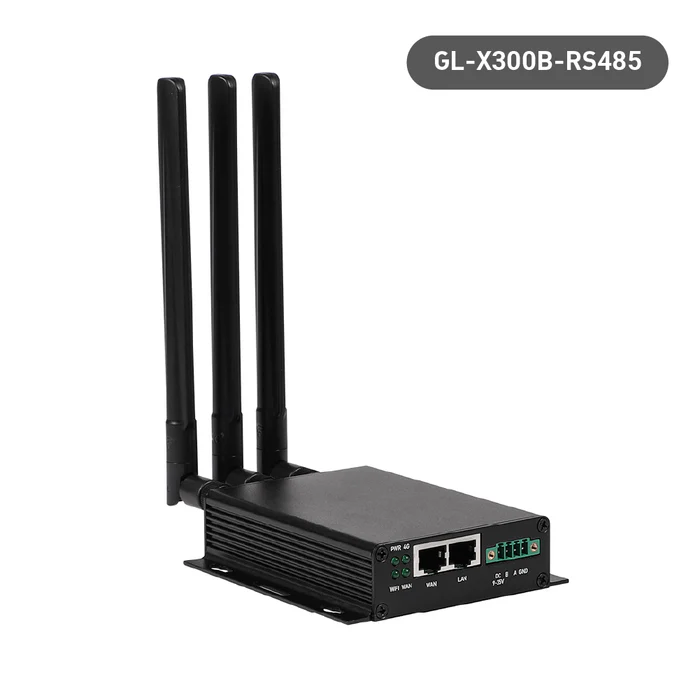
بوابة 4G الصناعية Collie (GL-X300B) | الإصدار العالمي RS485 / EG25-G | قابس الولايات المتحدة والاتحاد الأوروبي والمملكة المتحدة وأستراليا

بواسطة GL.iNet
السعر الأصلي USD99.00 - السعر الأصلي USD99.00
السعر الأصلي USD99.00
USD69.00
USD69.00 - USD99.00
السعر الحالي USD69.00
اختر أ Type
⚠️BEFORE YOU BUY
  • The cellular feature is restricted in Russia, Belarus, Cuba, Iran, North Korea, Syria, and the Crimean Peninsula due to modem limitations.

Bulk Order

For bulk orders of 30 units or less, please refer to our Partner Program for wholesale pricing and details. For larger orders of more than 30 units, kindly contact our customer service team at cs@gl-inet.com.

Collie (GL-X300B) عبارة عن بوابة خلوية صناعية مصممة للعمل في درجات حرارة عالية وفي سيناريوهات ذات مخاطر مادية محتملة. RS485 إصدار توفير الاتصال لعقد الإرسال/الاستقبال المتعددة.

وصف المنتج:

  • وحدة المعالجة المركزية مستقرة:يأتي Collie مع شريحة Qualcomm QCA9531. توفر أداءً مستقرًا كما تُستخدم بشكل شائع في الصناعة، وهي مثالية للمستخدمين الصناعيين لتجنب الأعطال.
  • وحدة 4G LTE مدمجة:يأتي جهاز Collie بفتحة بطاقة SIM قياسية تدعم شبكة 4G LTE. ويمكنه الانتقال إلى شبكة 4G LTE اللاسلكية في حالة فشل شبكة الإنترنت عبر Ethernet، وذلك لضمان نقل البيانات بشكل مستمر في المرافق الحيوية.  لا يتم دعم شبكة Verizon في الولايات المتحدة.
  • مراقب مدمج:يضمن جهاز المراقبة المدمج استقرار Collie. فهو جهاز مخصص يمكنه اكتشاف وتفعيل إعادة تعيين المعالج إذا لزم الأمر.
  • وحدة RS485:يدعم GL-X300B-RS485 نقل البيانات ثنائي الاتجاه لمختلف الأجهزة في مجال الأتمتة الصناعية وإنترنت الأشياء، وبالتالي تحقيق وظائف اكتساب البيانات والتحكم والمراقبة.
  • تكوين سهل:يدعم أمر AT، والاتصال الهاتفي اليدوي/التلقائي، والتحقق من قوة الإشارة في لوحة الإدارة الجديدة الخاصة بنا لتحسين الإدارة والتكوين.
  • مفتوح المصدر وقابل للبرمجة:تم تثبيت OpenWrt مسبقًا. مثالي للمطورين أو تطوير تكامل إنترنت الأشياء. 
  • أمان عالي:يدعم أكثر من 30 مزود خدمة VPN، بما في ذلك OpenVPN وWireGuard. ويدعم Cloudflare وNextDNS.
  • تصميم مضغوط:تم تصميم غلافها المصنوع من سبائك الألومنيوم وتصميمها الاختياري المثبت على الحائط ومجموعة واسعة من درجات حرارة التشغيل لسهولة التركيب والتخزين والتشغيل في البيئات الصناعية القاسية.

            Specifications:

            • CPU: QCA9531, @650MHz SoC
            • Memory / Storage: DDR2 128MB / NOR Flash 16MB
            • Protocol: IEEE 802.11b/g/n
            • Wi-Fi Speed: 300Mbps (2.4GHz)
            • Antennas: 2 x 2.4G Antennas, 1 x 4G LTE Antennas
            • Cellular: CAT4 EG25-G module
            • Battery: N/A
            • TF Card Slot: N/A
            • USB Port: N/A
            • Ethernet Port: 1 x WAN port, 1 x LAN port
            • Ethernet Speed: 10/100Mbps
            • Power Input: DC5521, 12V/1A (5.5*2.1mm) [default adapter] / 9~36V
            • Power Consumption: <4W
            • Dimension / Weight: 104 x 113 x 28mm / 235 غرام

            Package Content:

            • Collie (GL-X300B RS485 Version) X 1 (2-year Warranty)
            • Ethernet cable X 1
            • User manual X 1
            • External 4G antenna X 1
            • External Wi-Fi antenna X 2
            • Terminal block (Green) X 1
            • Plastic wall plug and screw set for wall installation X 1
            • Din rail clip and screw set for DIN rail installation X 1
            • Power adapter set (US, UK, EU and AU plug) X 1 (three-months Warranty)

            FAQ

            Product Initial Setup Guide

            Visit the User Guide page and choose the product model and specification required for setup from the options on the left-hand side of the page.

            How to Set Up OpenVPN Client on GL.iNet Router

            Navigate to the OpenVPN Client Configuration section, where you can follow the provided guide to effortlessly unlock NordVPN and OpenVPN settings, ensuring seamless VPN functionality.

            How to Set Up WireGuard Client on GL.iNet Router

            Visit the WireGuard VPN Client page and refer to the guide to effortlessly configure settings for AzireVPN, Mullvad, and other WireGuard client features.

            How to Connect to the Internet via an existing Wi-Fi by Repeater

            Repeater Mode Basic Setup Guide

            How to Build Your Own WireGuard Home Server

            Proceed to the Tutorials section and refer to the guide to effortlessly complete the setup of your WireGuard Home Server.

            How to do if Can't access web Admin Panel

            Visit the FAQ page and search for the "Can't access the web Admin Panel" section to find the specific reasons and solutions for this issue.

            1

            قارن بين المنتجات

            {"other"=>"{{ count }} من 3 عناصر مختارة", "one"=>"حدد 2 أو 3 عناصر للمقارنة"}

            حدد العنصر الأول للمقارنة

            حدد العنصر الثاني للمقارنة

            حدد العنصر الثالث للمقارنة

            يقارن